- contact@verticalserve.com
- Part of the Insight broker suite — InsightDealDesk · InsightDueDiligence
How it works
How InsightDueDiligence works
The architecture, the engagement lifecycle, the agents and the controls — how the agents, the people and the record fit together.
Overview
InsightDueDiligence is a workbench for a broker’s deal practice in which nine agents review a deal target’s insurance program and people review every finding and make every decision that leaves the product.
An engagement reviews one target. Its workspace runs a pack — for insurance program diligence, the insurance_program pack: 25 questions in 8 sections, the practice’s benchmarks, finding categories, a report template and engagement controls. A vendor pack runs vendor due diligence on the same flow.
Architecture
The API (Python, FastAPI) holds the engagements on PostgreSQL in its own schema and runs the agents, the engines, the controls, the copilot and the hand-off. The UI (React 19, Vite, Tailwind) is the deal broker’s workbench, built on the shared Insight UI kits. Identity, workforce, the diligence core, the agent framework, the Rules Studio, the decision record and the copilot framework are shared Insight platform packages, the same ones InsightDealDesk is built on.
Who calls it
React UIWorkspace, engagements, admin
InsightXtractCalls back with fields and citations
The service
InsightDueDiligence APIFastAPI: agents, engines, controls, copilot, hand-off
Insight platform
IdentitySign-in, roles, audit
DiligenceData room, playbook, findings, reports
AgentsPipeline, autonomy, traces
Rules & decisionsControls and the decision record
AssistThe copilot
Data, models and the suite
PostgreSQLSchema
diligenceObject storeDocuments; never local disk
Claude on BedrockAgents and copilot
InsightPulseSigned lookup: Target 360
InsightDealDeskSigned POST of reviewed findings
The engagement lifecycle
Six stages, each guarded by the API, not just the screen:
| Stage | To enter it |
|---|---|
| Scoping | The engagement is opened with its target, client, due date and Pulse lookup key. |
| Data room | The engagement has a data room. |
| Analysis | The data room has documents. |
| Review | The agents have run and produced findings. |
| Report | No high or critical finding is still pending review. |
| Delivered | A final report exists and no engagement control blocks. |
Moving back a stage needs a reason, which is recorded.
Run it
# the schema, its tables and the illustrative book (idempotent; never prints a secret)
python scripts/dev_setup.py

# the API (Bedrock on for the agents and the copilot when AWS_REGION is set)
uvicorn app.main:app --port 8126

# production: Alembic to head, then the engagement controls
python -m app.migrate

# the UI (development; proxies /api to the API)
npm install && npm run dev
Tests run in a throwaway schema per run and never reach a real model: Bedrock is refused at the AWS client and counted.
Configuration
| Setting | What it does |
|---|---|
INSIGHT_DATABASE_URL / _SECRET / _SCHEMA | The platform Postgres, by secret reference (never a password in the environment); schema diligence. |
AWS_REGION | Turns Bedrock on for the agents and the copilot. DILIGENCE_AGENTS_LLM=0 and DILIGENCE_COPILOT_LLM=0 switch them off. |
DILIGENCE_AGENTS_MAX_LEVEL | The autonomy ceiling; default L2. |
PULSE_BASE_URL, PULSE_API_KEY, PULSE_LOOKUP_SECRET | InsightPulse for Target 360. Without it the illustrative stand-in answers. |
DEAL_BASE_URL, DILIGENCE_DEAL_HANDOFF_SECRET | The hand-off to InsightDealDesk. Without both, hand-offs are held in the outbox. |
INSIGHT_STORE_DOCUMENTS | Object storage for uploads. Without it uploads are refused; nothing is written to local disk. |
INSIGHT_DILIGENCE_PACKS | Extra pack folders, after the built-in ones. |
The playbook
The insurance_program playbook has 25 questions in 8 sections, each worked by one agent: Data room (4), Program inventory (4), Coverage adequacy (2), Claims experience (3), Tail, run-off and change of control (3), Subsidiaries and target 360 (4), Contingent liabilities (4) and Post-close program (1). Each question has a priority, whether it is required, the document categories it expects and the check that answers it. The Documents zone shows each question’s status — answered or gap — and the agent’s answer.
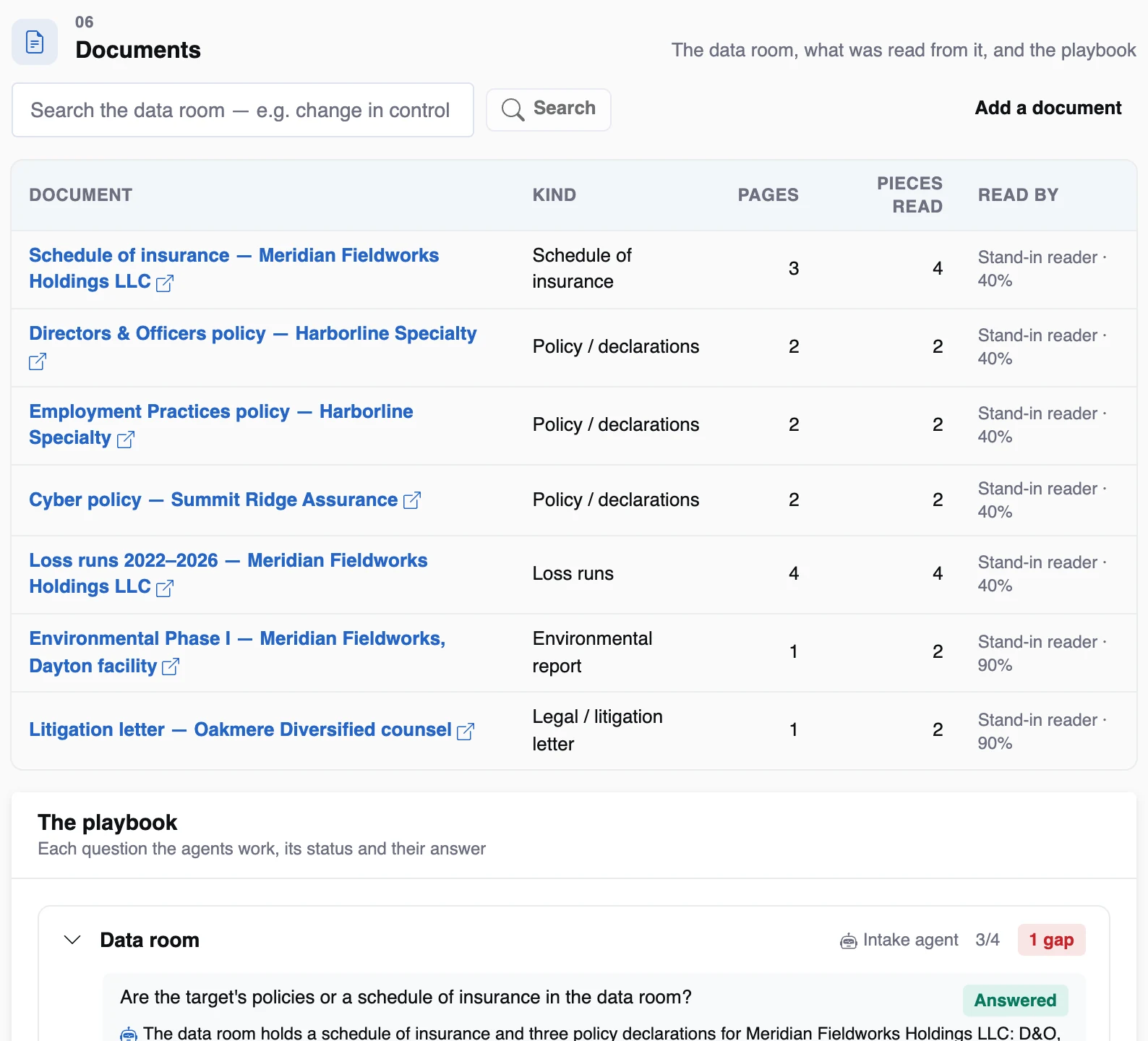
The data room and the playbook on an illustrative target.
Reading the data room
Documents are uploaded to object storage (allowed types only, signature-checked, size-limited) and read into page-level pieces. In production InsightXtract reads them — OCR, layout and tables — and calls back with fields and citations; without it, a stand-in reader returns the same shape from the document’s text, and the Documents zone says which reader was used. A policy becomes line, carrier, policy number, named insured, period, limit, retention, premium, trigger, retro date, structure, collateral, financing and change-of-control clause; a loss run becomes one row per claim.
Engines and figures
Every figure is the engines’: totals, frequency and severity by line and year, open reserves, large losses over the threshold, gaps against the benchmark, tail estimates and the program after closing. The benchmarks — core lines, lines by sector, revenue bands, the large-loss threshold, D&O run-off years, standalone uplift by program structure and tail multiples by line — live in the pack and are the practice’s to set. The demo ships illustrative ones and labels them so.
Agents
Analyze runs nine agents in order: data room, program, coverage gap, loss run, tail & run-off, subsidiary, contingent liability, report and supervisor. Each runs as itself, with its own identity, at its autonomy level. The first seven work their playbook sections: the check finds the facts, then the agent reasons over them with Claude in a fixed shape that cites facts by id. “What would they do?” runs the same pipeline with nothing written.
Every call has guardrails: personal data masked before the prompt, a daily budget per agent, a circuit breaker on the model, versioned prompts and a trace with model, tokens and cost. With no model configured, each agent’s own findings are the answer and say so.
Autonomy
Four levels — L1 draft, L2 ask first, L3 act and tell, L4 act. The level for an action is the lowest of the agent’s level (optionally per sector), the action’s hard cap and the tenant ceiling (L2 by default). The four governed actions — ask the seller, deliver the report, share with the R&W placement, sign off outside standards — are capped at L2. An hourly roll-up recommends a promotion at 90% agreement over 50 answers and demotes at once below 70% over 20.
Prepared decisions
What an agent prepares appears under “Prepared for you” with the agent, its level, whether Claude reasoned it, its confidence, the reasons and the facts behind it. A person answers Accept, Change, Reject or Ask. Accept and change carry out the action as that person; outside production, sends are dry runs. Every answer is signed on the decision record and counted as evidence for the agent’s level. A newer run supersedes an older open ask for the same action.
Findings and review
Findings have a category (missing document, program, coverage gap, limit adequacy, claims experience, large loss, tail or run-off needed, change of control, subsidiary not on the program, contingent liability, captive or collateral or financing, post-close cost, intelligence), a severity, a key-finding flag and citations. A broker approves, changes or rejects each; only approved and changed findings reach the report or the hand-off.
The decision record
Each Analyze writes a run of the engagement controls — hits with their rule, evidence and outcome — and a verdict ranked decline > hold > refer > needs info > proceed. Reviews, answers, sign-offs, stage moves and hand-offs are recorded with who did them. Runs are appended, never overwritten.
Engagement controls
Four starter controls ship in the Rules Studio: high or critical findings not reviewed (block), fewer than five years of loss runs (warn), claims-made cover with no tail planned (refer) and due within a week with gaps open (refer). They read computed facts about the engagement, never a model’s opinion. A draft is tested against a real engagement before it is published; publishing is versioned and audited.
The copilot
A side panel on every engagement. It plans, calls eight read-only tools — overview, program, claims, findings, gaps, Target 360, search and cost — on the engagement in the asker’s scope, and answers with numbered sources. Figures are checked against what the tools returned; an unsupported one becomes “not in the record”. It suggests follow-up questions and never takes an action.
The connected suite
| Product | Direction | What |
|---|---|---|
| InsightPulse | In | Company profile, corporate hierarchy, industry, leadership and news for Target 360, by signed lookup with a timeout and a short cache; every fact carries its as-of date. |
| InsightXtract | In | Documents read into fields and citations, with the read’s confidence. |
| InsightDealDesk | Out | Reviewed, R&W-relevant findings as likely exclusions: POST /api/deal_intake/diligence-findings, contract diligence_findings.v1, signed in X-Insight-Signature, idempotent per finding; held in the outbox when unconfigured. |
Security and deployment are on their own page: Security & deployment.